Friday, May 6, 2011

Beezag: Cash out as Amazon Gift Cards

I have been using Beezag for quite a while now and I have saved up a lot of points on there. The only thing that was bugging me is that there is only the option of cashing out as PayPal. I don't use PayPal and I was wondering what I can do with my points. So I asked them if I can request for an Amazon Gift Card payment instead. They said yes, but it is a bit tricky. Here is a screenshot of my email. You can click it to view the full size.

My email.

If you are too lazy to read it, they said... You will need to go cash out as PayPal first, then send them a support ticket saying you want to cash out as an Amazon Gift Card instead. They will process it and email you the redeem code. :) If you need help redeeming Amazon Gift Cards, I have a tutorial here.

ZoomBucks: Paid to Read Email

Make sure you read ZoomBucks emails! They sometimes will pay you 1 ZBuck for reading emails. Generally the title will include the words "Paid to Read Email".


Now go to the email and click the button labeled "Visit Site".


Wait for the page to load, and you'll see a "Click here to confirm reading this email" link below everything.


There! You just got yourself a bonus ZBuck!

Yay! 1 ZBuck!

Tip: If you are using Gmail, make a filter that will label emails like this with the label "Zoombucks Paid Email". Go to mail settings (top right hand corner). Go to filters and create a new filter. Put the email address of the mail in the email box, and type "Paid to Read Email" in the Subject box. Click Next, and check the box that says Apply the Label, and make a new label! Next time you get an email like this, it will stand out! You might want to change the label color to red.

Tuesday, May 3, 2011

Another Bing Rewards Testimonial

Email with Code.

Yay! Another $5 Amazon Gift Card from Bing Rewards! Now I have around $10 on my Amazon account. :)

Yes! $9.49

Just another proof Bing Rewards isn't a scam. Why would Microsoft scam you in the first place? LOL So, if you haven't signed up! Do it! I made $10 in Amazon Gift Cards from them so far. My last testimonial is here.

Monday, May 2, 2011

Swagbucks: How to Snag an Amazon Gift Card

A lot of new users probably don't know how to snag, or order an Amazon Gift Card on Swagbucks. If you are one of them, this tutorial is for you! :) Make sure you have at least 450 SB in your account. 450 SB is needed for a $5 Amazon Gift Card.

Go to the Swag Store. On the home page, you will find a link to the Swag Store in the bar on the left hand side. You can also hover over "Redeem" on the bar at the top of the page, and click Swag Store.
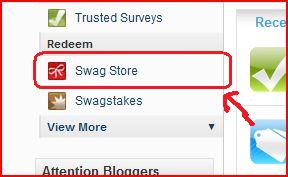
Swag Store link in the bar on the left on the home page.
Once you are in the Swag Store, go to the Gift Cards section of the Swag Store. You can get the by clicking on the Gift & Rewards Cards link.
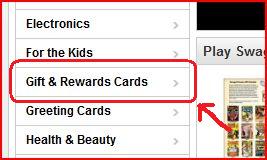
Gift & Rewards Cards link is in the bar on the left.
Now find the Amazon Gift Card you want. I recommend the $5 ones. If you want to know how to efficiently use your SBs on  Amazon Gift Cards, I'll have a link at the end of this post.

$5 Amazon Gift Cards have the best value.
Now click on the item and click "Snag This!". Please remember you are limited 2 prizes a day and 5 of the same item per month.
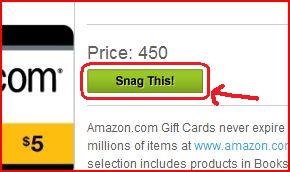
Snag This! button.
If you have reached your limit, it will tell you, if you haven't, it will take you to a page where you have to fill out your name and address. Fill it out and press "Submit Order".
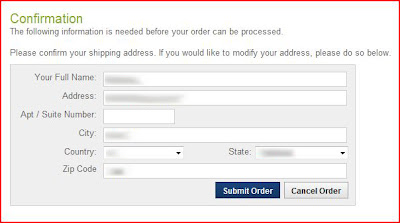
Submit your information.

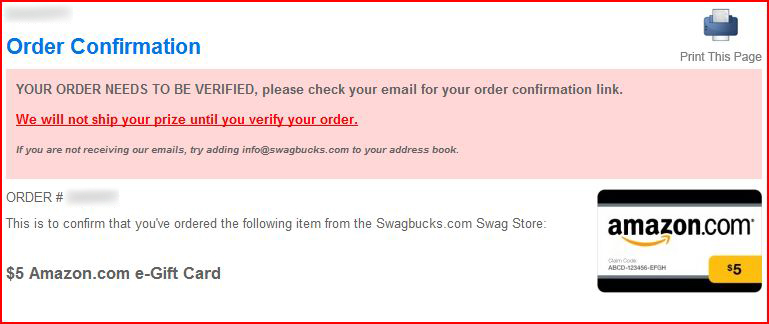
Now it will take you to a page saying that you haven't verified your order yet.
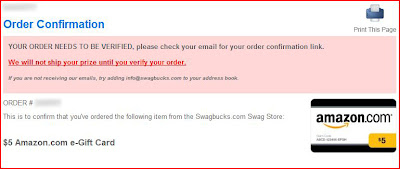
YOUR ORDER NEEDS TO BE VERIFIED!
Now, go to your email and check for a verification email. If should something like the following.
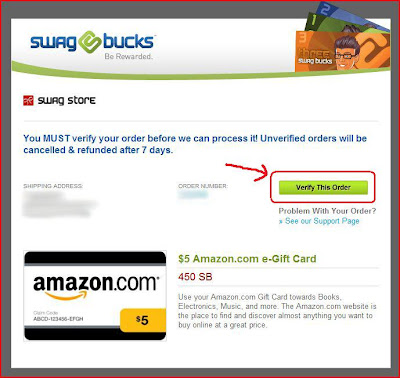
Verification Email
After you click "Verify This Order", you will be taken to a page confirming your order.
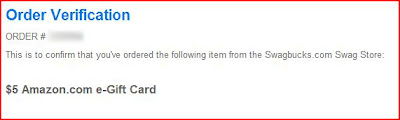
Order Verified

Now it will appear as verified in "Order Status". Once it is finished processing, it will say "In My Gift Cards".
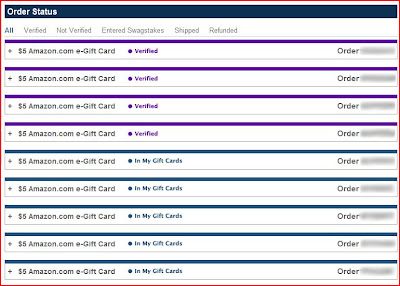
You order status.

And there you go! :) Ordering or snagging an Amazon Gift Card is easy as pie!

If you need help finding the gift card codes after it is done processing, please see the blog post here.
If you need help redeeming an Amazon Gift Card, please see the blog post here.
If you want to know how to efficiently use your SBs on Amazon Gift Cards, read the blog post here.

Sunday, May 1, 2011

Free Lacoste Perfume Samples


Free Lacoste Perfume Samples! All you need to do is give them your name, email, address, and what sample you want and they will ship it to you for free! The free samples is available here.

This offer is real. I ordered mine like 2-3 weeks ago and just got it in the mail yesterday. It smelled really nice! The only thing I didn't like was because I was expecting a small bottle of the perfume. Turned out, they mailed me this post card with one of those foil bag thingys that you sometimes find in magazines attached to it.

If you enjoyed this offer, there is more offers like this on Points2Shop. There is a whole list there. Just go to Earn Points >> Freebies.

Don't know what Points2Shop is? Points2Shop is a website that pays you to click links, play game tournaments, and complete offers! The best thing I like about them is that they will pay you $1 per referral from the United Kingdom and the United States and 20¢ per referral from Canada. You get $2.50 (250 points) free when you sign up.
  • Prizes includes anything that is available from Amazon.com. This includes games, electronics, etc.
  • Cash out as check, PayPal, Amazon Gift Card, and more!
  • Rewards are ordered with in 1-2 business days. 
  • $1 referral credit per UK/US referral. 
  • Offers include the "Daily Click Offers" where you are paid to click links and each "Daily Click" can be repeated once every 24 hours. 
  • "Spin2Win" game available so you can earn even more after completing an offer. This is available for most offers. You can earn lottery tickets, merits and entries to sweepstakes.
  • Weekly lottery with raising jackpot. 
  • Win points by participating in paid game tournaments.
Related Posts Plugin for WordPress, Blogger...